Designing usage management and AI session watch journey for a analytics platform
My role
Product Designer
Team
Product Manager, Engineering
Target Audience
PM, UX Researcher, Analysts
Platform
Web
Context
UXCam's AI analyst could watch session recordings and answer natural-language questions about user behavior, however it watched sessions at random, so users often got incomplete answers about the sessions that actually mattered to them. As the company prepared to monetize the AI with paid plans, I led the design of a system that gave users meaningful control over which sessions the AI analyzed, while keeping the credit model transparent.
Problem
UXCam records thousands of sessions daily. The company's AI analyst watches those recordings, identifies friction points, and answers questions like "Why are users dropping off during onboarding?". But AI could only watch roughly 100 sessions per day, prioritizing recent, shorter sessions. Customers were recording far more than that. This created a real gap: the sessions a user cared about most often hadn't been watched yet and there was no way for the user to make AI to watch those sessions. When users asked AI questions about specific user segments, funnels, or errors, it couldn't answer reliably, not because she wasn't capable, but because she hadn't seen the right evidence.
With growing competition from tools like FullStory adding AI features, leadership decided to move fast and monetize the AI through paid analysis plans, introducing an entirely new minute-based credit management.
Challenge
I needed to design a way for users to direct their purchased analysis time toward specific sessions, and a way for teams to understand and manage how that time was being consumed across multiple apps. The goal was to make AI feel reliable and worth paying for without compromising the integrity of her product insights.
Research
To understand what "control over AI analysis" should actually mean for users, I mapped the different paths users took to reach sessions like from session lists, filtered views, funnel drop-offs to understand exactly where and how the "not watched" gap surfaced. I aligned with engineering and data science to understand the real technical constraints around parallel processing, session length pricing, and what was actually buildable. I reviewed how competing analytics platforms approached AI-assisted analysis and credit models. And I ran validation sessions with beta testers to test different approaches for selecting sessions.
Insights
What emerged reshaped the problem entirely:
The bias problem made full user control impossible: If users could watch only the sessions where they suspected issues: rage taps, drop-offs, errors. AI's broader insights would skew negative. Asked "What's my overall conversion rate?", it'd give an artificially low answer because only problem sessions were in her dataset. Leadership's needed a mandatory 50/50 split between automatic random analysis and user-directed analysis which could avoid such biases. However, it created its own design challenge as users who paid for minutes would feel like they only controlled half of what they bought.
Users come with a purpose, not a habit: Unlike daily-use tools, users typically visited UXCam when investigating a specific problem. This meant the analysis selection needed to support both on-demand and eventually automated workflows (MVP2). Beta testers strongly preferred automated workflows but that was too technically complex for the MVP1 timeline.
Solution
Transparent Minute Allocation Dashboard
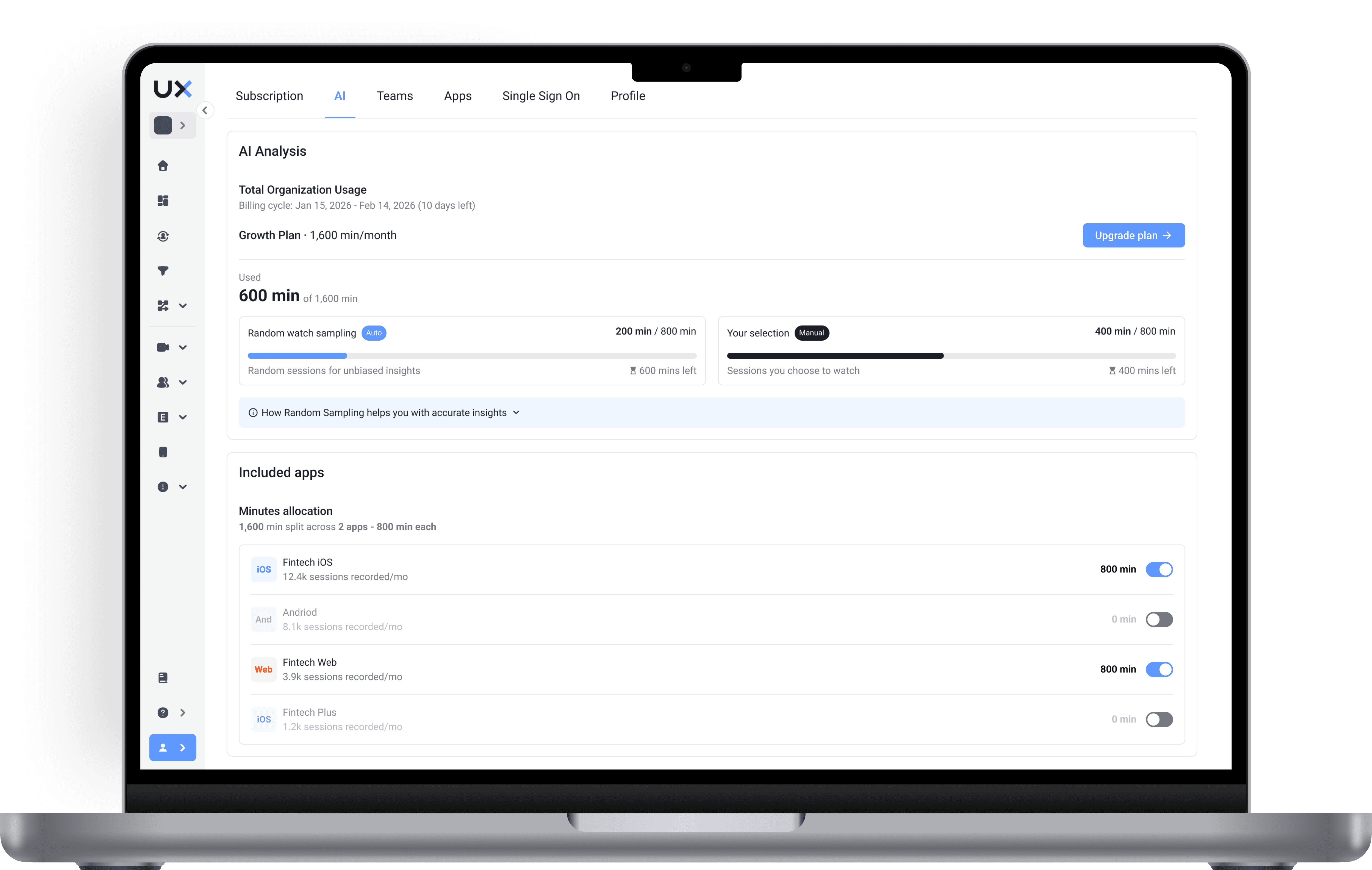
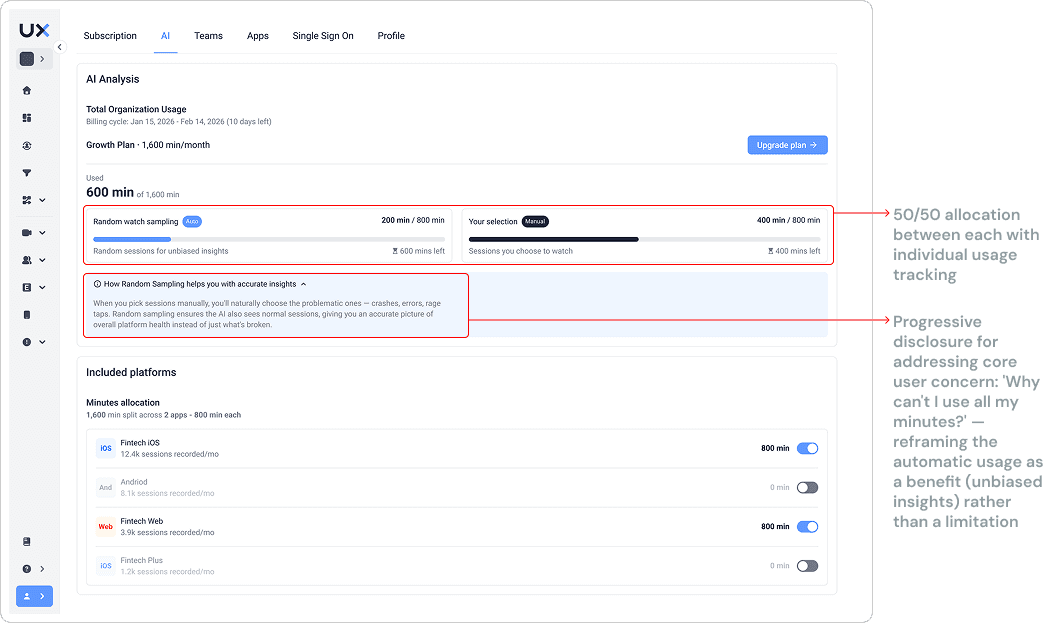
I designed a persistent allocation dashboard that shows two distinct pools "Random watched" and "Your selected" each with its own progress bar. This communicates three things immediately: how much total time was purchased, how much is reserved for unbiased coverage, and how much the user controls.
It was important to positions the automatic split as a data quality feature by sharing that "we protect the integrity of your insights." by avoiding biases.
Addressing the context bar confusion
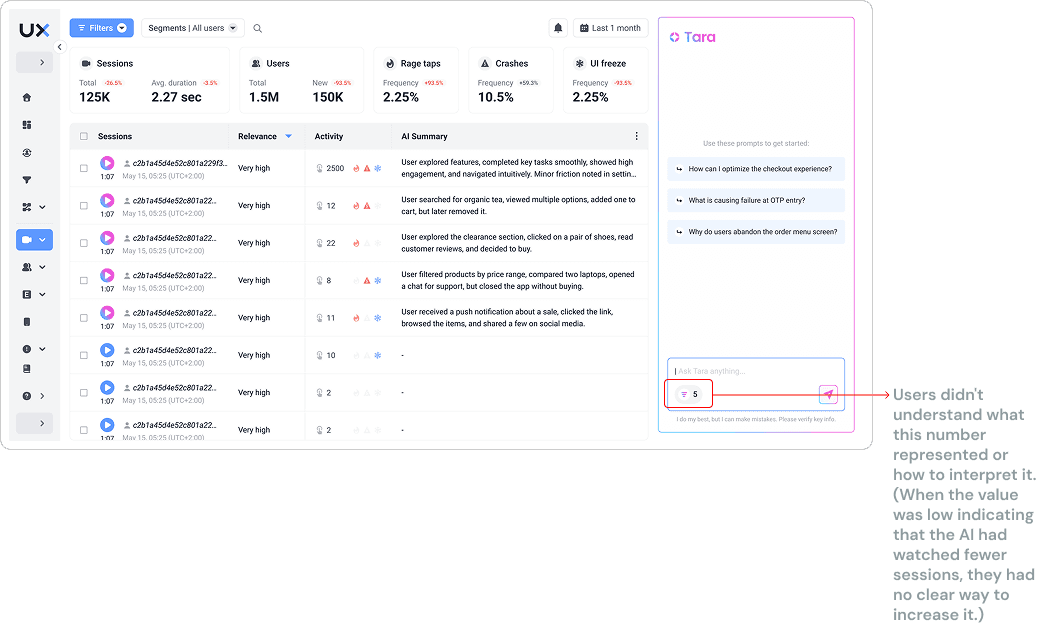
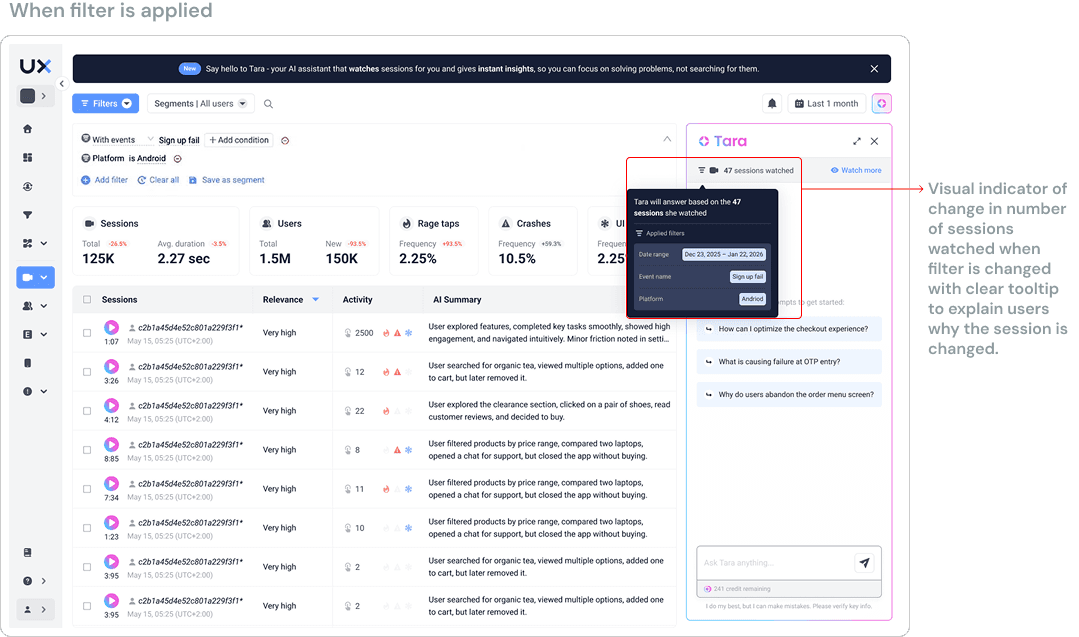
Beta users were confused when the session count changed after applying filters and more importantly what this number meant. I added a label showing "X sessions watched" and a rich tooltip that appeared on count changes, explaining "Showing analyzed sessions matching your current filters."
Batch Session Analysis Selection
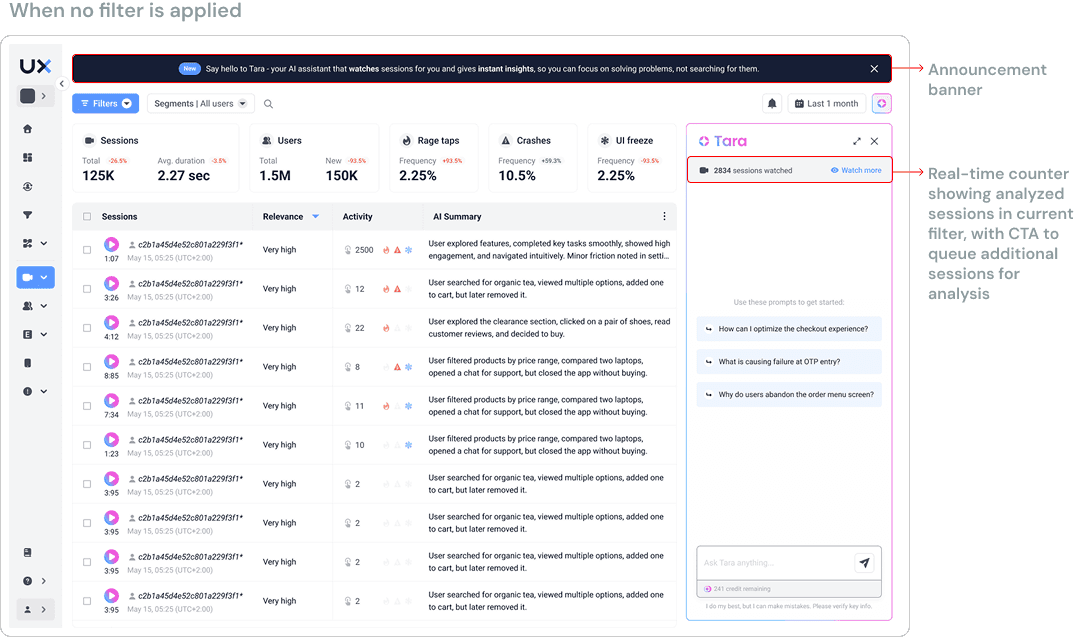
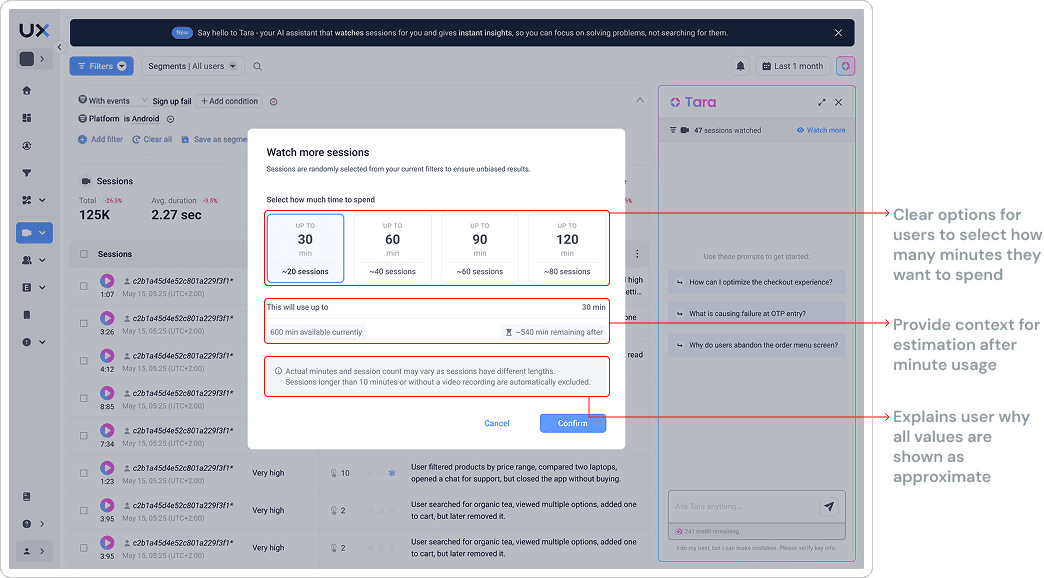
In the chat, where the user can clearly see how many sessions have been watched by AI, "Watch more" action was integrated which allowed users to select how many sessions they would want to their AI watch list. An estimated minutes preview calculates cost based on average session lengths in the selected batch, so users know what they'll spend before committing. A confirmation step shows session count, estimated cost, and remaining balance, giving users a moment of informed control before the credit is spent.
Analysis Status Integration Across Entry Points
Designed consistent "status" indicators across all the places users encounter sessions - the session list, funnel views.
In the session list: Each session shows a small indicator - a checkmark for watched, a clock for queued, and no indicator for not watched. Users can filter by analysis status to quickly find gaps.
Constraints
The 50/50 split felt like losing half your purchase: Users who paid for minutes expected full control. I leaned into explaining the why using contextual education to reframe automatic analysis as a system feature that protects insight quality, not a limitation imposed on users.
Limited validation window: The project transitioned before extended testing was possible. I documented detailed design specifications, edge cases, and decision rationale so the engineering handoff didn't lose context.
Outcome
The AI session analysis system launched as part of UXCam's paid AI product. The aim was to make AI feel reliable enough to pay for, which required users to trust both what she knew and how their credits were being spent. Beta testers who went through the validated designs responded positively to the allocation split explanation, and the batch selection flow aligned with how they naturally investigated issues (by filtering first, then digging in).
Without a post-launch measurement window, quantitative adoption data wasn't available. But the design directly addressed the core failure mode: users asking questions AI couldn't answer because she hadn't watched the right sessions. By giving users control over her inputs, the reliability of her outputs becomes something users can directly influence, which is the foundation any paid AI feature needs.
Reflection
The 50/50 split could have killed user trust if it was treated as a hidden constraint. Designing transparency and trust around it was important.
The bigger lesson: when you can't ship what users actually want (automated workflow), ship something that proves the core value and creates the natural upgrade path. Batch processing wasn't the vision, but it was the right foundation.