Designing for Adoption in an Enterprise CRM
My role
UX Designer
Team
Product Manager, Support Ops
Target Audience
Sellers, Admins
Platform
Web
Context
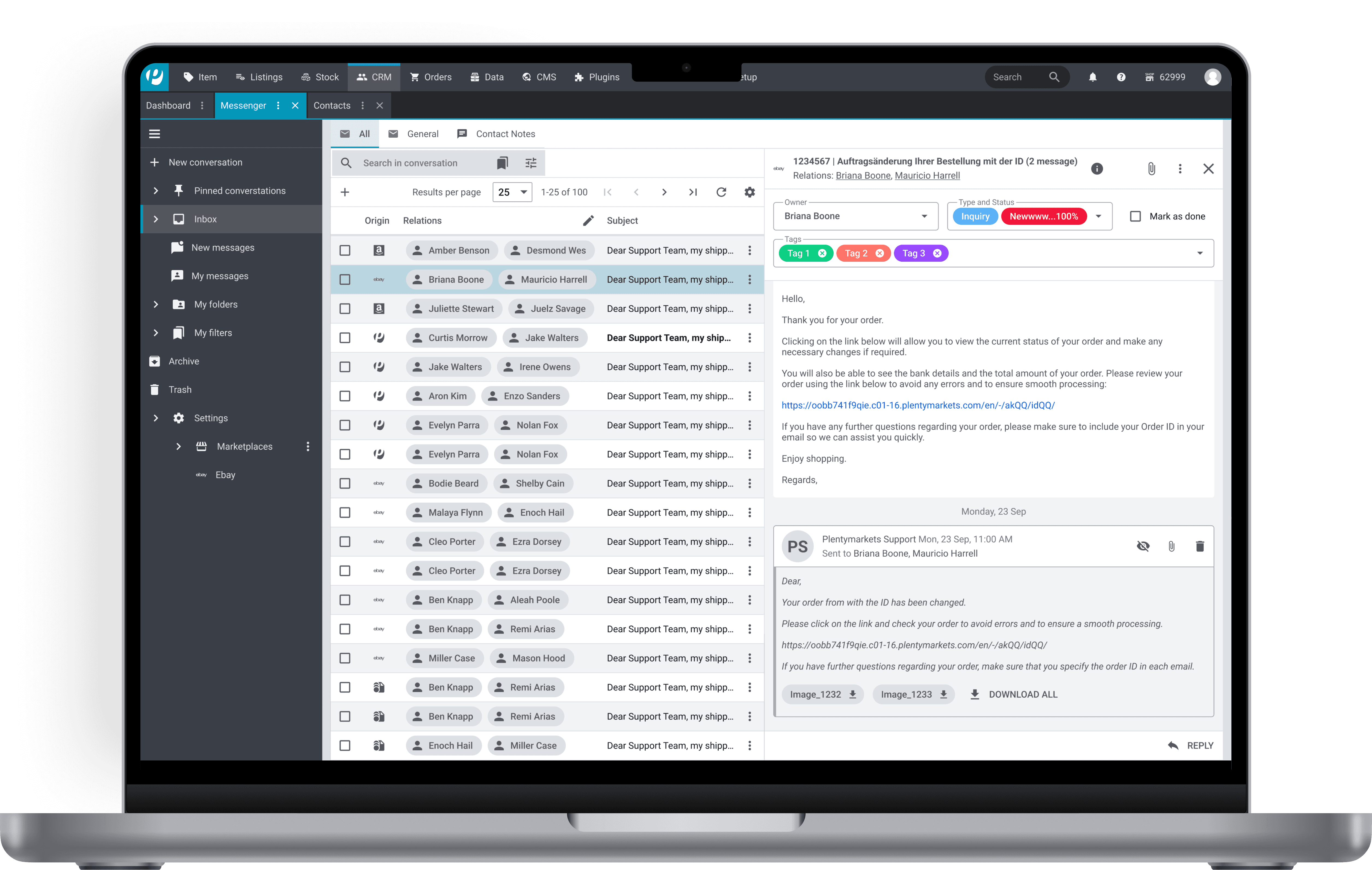
Nine months after a significant CRM migration to new UI, adoption had stalled at 20.1%. I led the research and redesign of the messenger experience restructuring it around how support agents actually work, not how the interface was built. The result: the legacy system was successfully retired and the team moved to a single-system workflow.
Problem
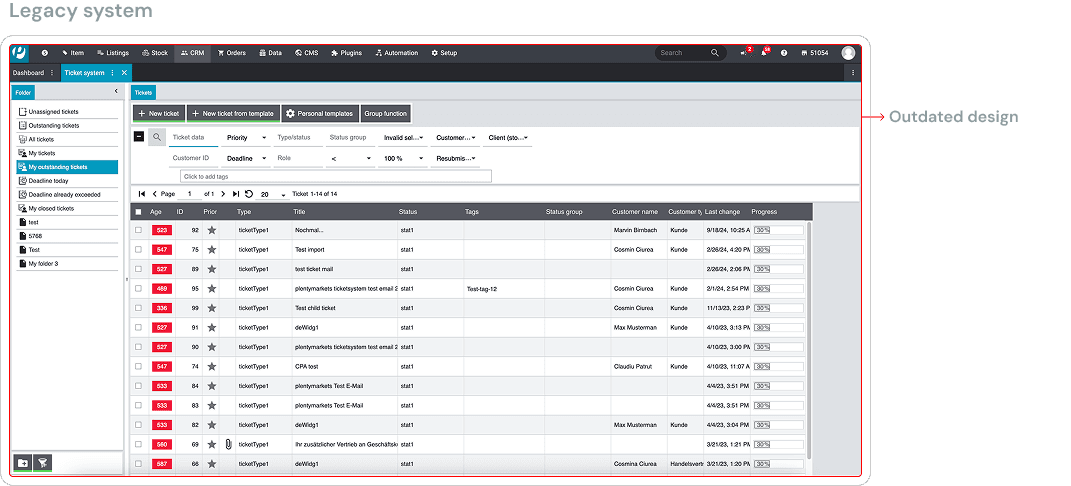
PlentyONE had invested heavily in migrating their support team from a decade-old legacy ticketing system to a modern CRM messenger. However, only 20.1% of the team had fully switched. Nearly 41% still worked exclusively in the old system, and 9.6% were stuck using both - creating operational overhead, and real risk of the entire migration being abandoned.
Challenge
My challenge was to redesign the messenger experience so that support agents who were handling 40–50 tickets per day that could work faster in the new system than they could in the legacy one. Until the new system was objectively better for daily workflows, there was no reason for agents to switch, and no path to legacy retirement.
Research
To understand why agents weren't switching, I ran surveys to surface pain points, interviewed stakeholders to understand the legacy system's unspoken strengths, analyzed feature usage in New Relic to see what was actually being used vs. ignored, and benchmarked against Freshdesk and HubSpot to check if this was a structural industry gap or just our implementation.
Insights
What I found changed the framing entirely: Users weren't resisting the new system because it was unfamiliar. They were resisting it because it was structurally slower for the work they did dozens of times a day.
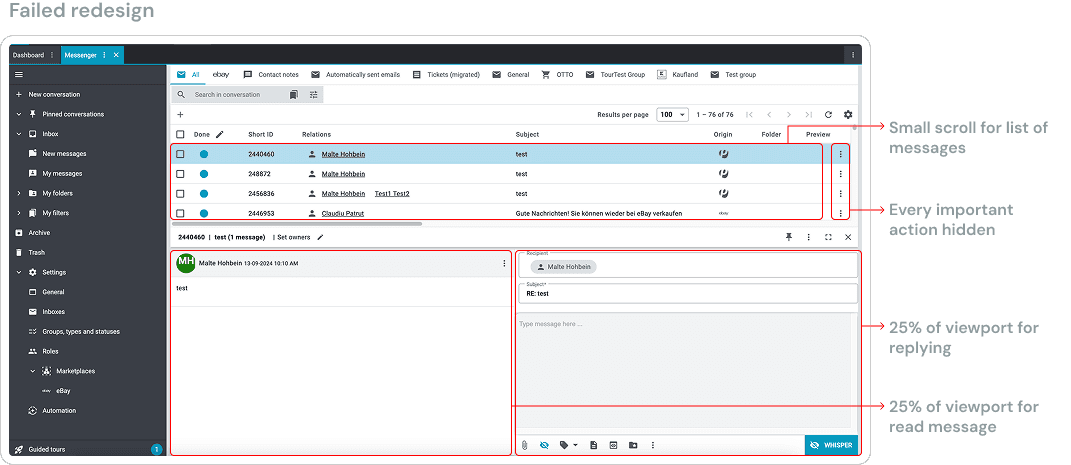
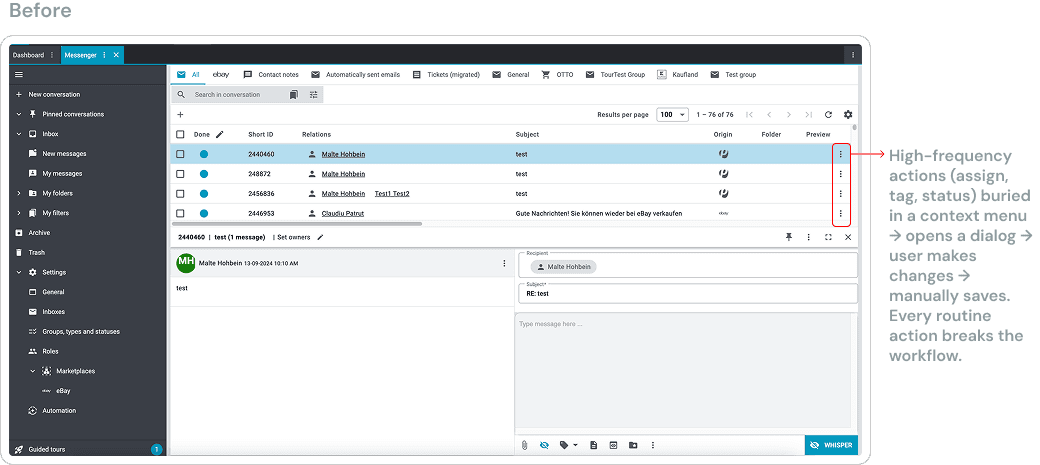
Core actions were buried: Replying, tagging, assigning, and resolving a ticket required 2–3 clicks in our messenger. Freshdesk and HubSpot surface these as single-click actions from the message view. This wasn't an edge case — usage analytics confirmed these were the most frequent actions in every agent's workflow. Message content had been deprioritized in a messaging tool.
The actual message occupied only 34% of the viewport: Navigation panels, sidebars, and whitespace consumed the remaining 66%. Agents couldn't read full customer messages without scrolling inside a constrained panel, which broke their focus mid-task.
"I often work with templates, and the reply area feels too small to comfortably review and edit them. It makes it harder to read through the content and respond confidently."Low-frequency features were stealing prime real estate: Features agents rarely or never used were persistently visible, adding cognitive load during the moments that required the most focus — reading and composing responses.
Solution
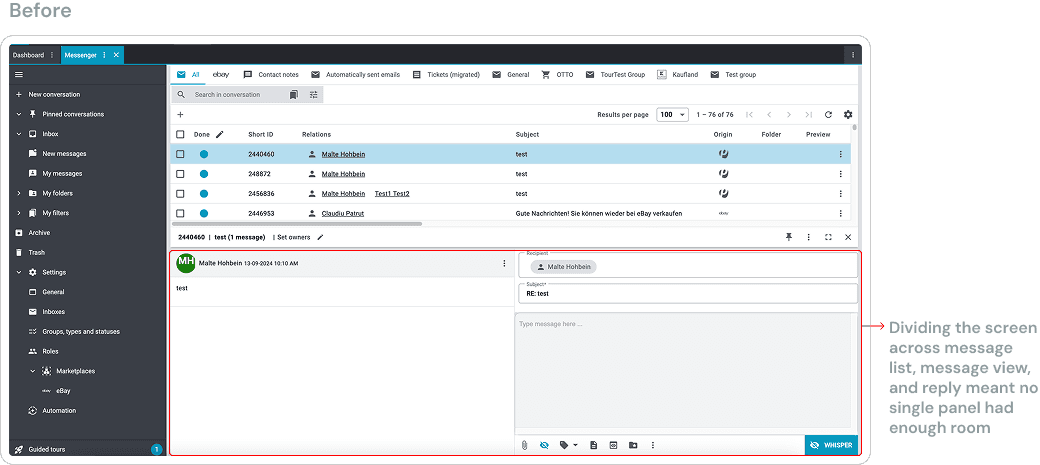
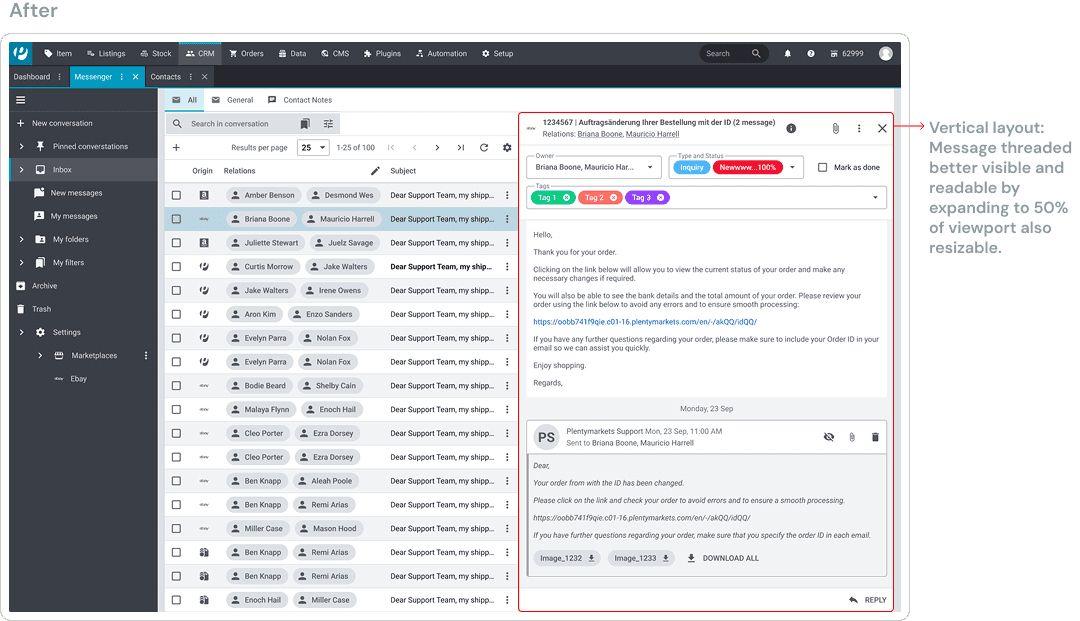
Shift the layout to be message first
Expanded the message reading area to prioritize content by making it vertical as it provided more reading space.
De-emphasized persistently visible elements that were rarely used.
Introduced a collapsible reply panel to reduce visual noise while reading.
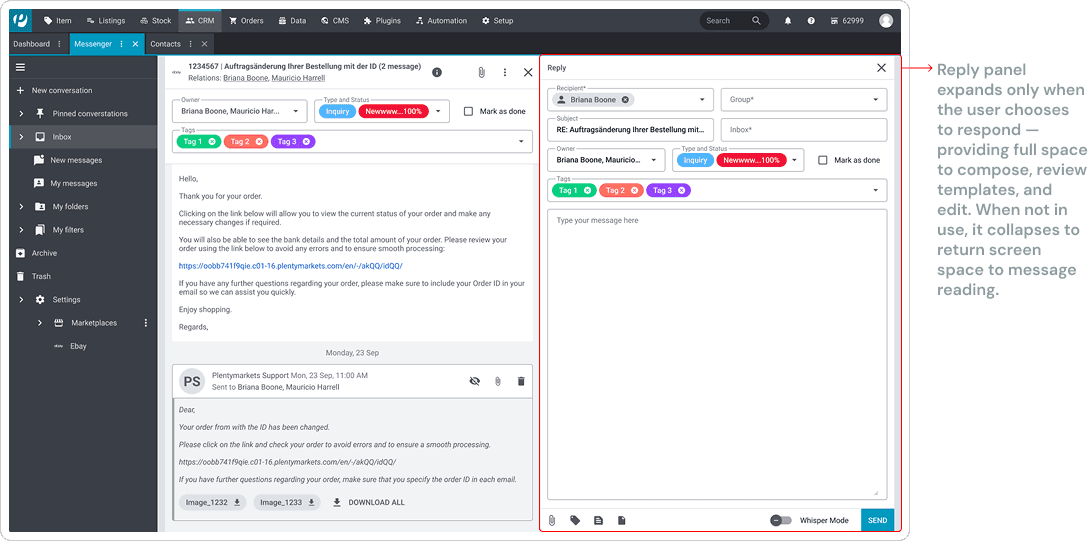
Introduce progressive reply interaction
Kept the reply panel collapsed by default during message so user can focus on reading first.
Expanded the writing area which opens only when the user actively chose to reply.
Maintained full message context while composing responses so user can read through the messages if needed while replying.
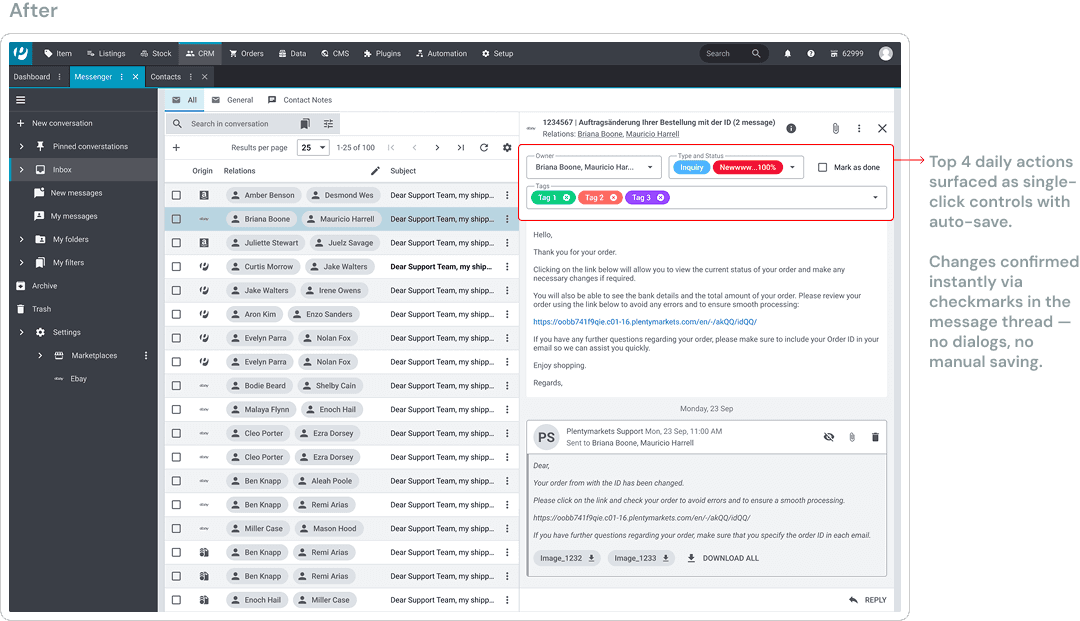
Reduce interaction cost for daily actions
Promoted the four most frequently used actions (owner, type and status, tag, mark as done) into the primary interaction area.
Moved low-frequency and administrative actions into secondary menus.
Constraints
Screen real estate: The messenger needed to surface a high volume of information in limited space. To reclaim vertical room for message content, we chose to remove a persistent header which was a deliberate deviation from global design guidelines. In this context, workflow efficiency took precedence over layout consistency.
Limited testing window: Due to leadership's decision to deprecate the legacy system on a fixed timeline, therefore 7 experienced support agents were available for evaluative feedback before production release. Rather than broad but shallow validation, I with my PM prioritized feedback from these high-usage, domain-expert users, these were the people whose workflows were most at risk and whose sign-off carried the most weight.
Outcome
The redesigned messenger is now live in PlentyONE's customer management and communication product. The company achieved its core goal: the legacy system was retired, and the support team moved to the new designed system which directly resolved the dual-system dependency that had been the source of operational chaos.
Although, we didn't capture quantitative adoption lift per feature. But qualitative signals were strong: agents shared positive feedback in internal forums, specifically calling out that the redesigned reading and reply flow matched how they actually work.
Reflection
This project reinforced that adoption in enterprise tools is a workflow problem, not a perception problem. Visual polish is table stakes. What drives switching is whether the tool fits how people work under pressure, with speed and predictability.
What I'd do differently: I'd push for a phased rollout with A/B testing between layouts. Not just to validate overall adoption, but to isolate which specific changes drove the most behavioral shift. That data would have been valuable both for this product and for establishing workflow-first design patterns across PlentyONE's tooling.