
My Role
Product Designer
Team
Product Manager
Engineering
Target Audience
Product Managers
UX Researchers
Analysts
Platform
B2B SaaS
Summary
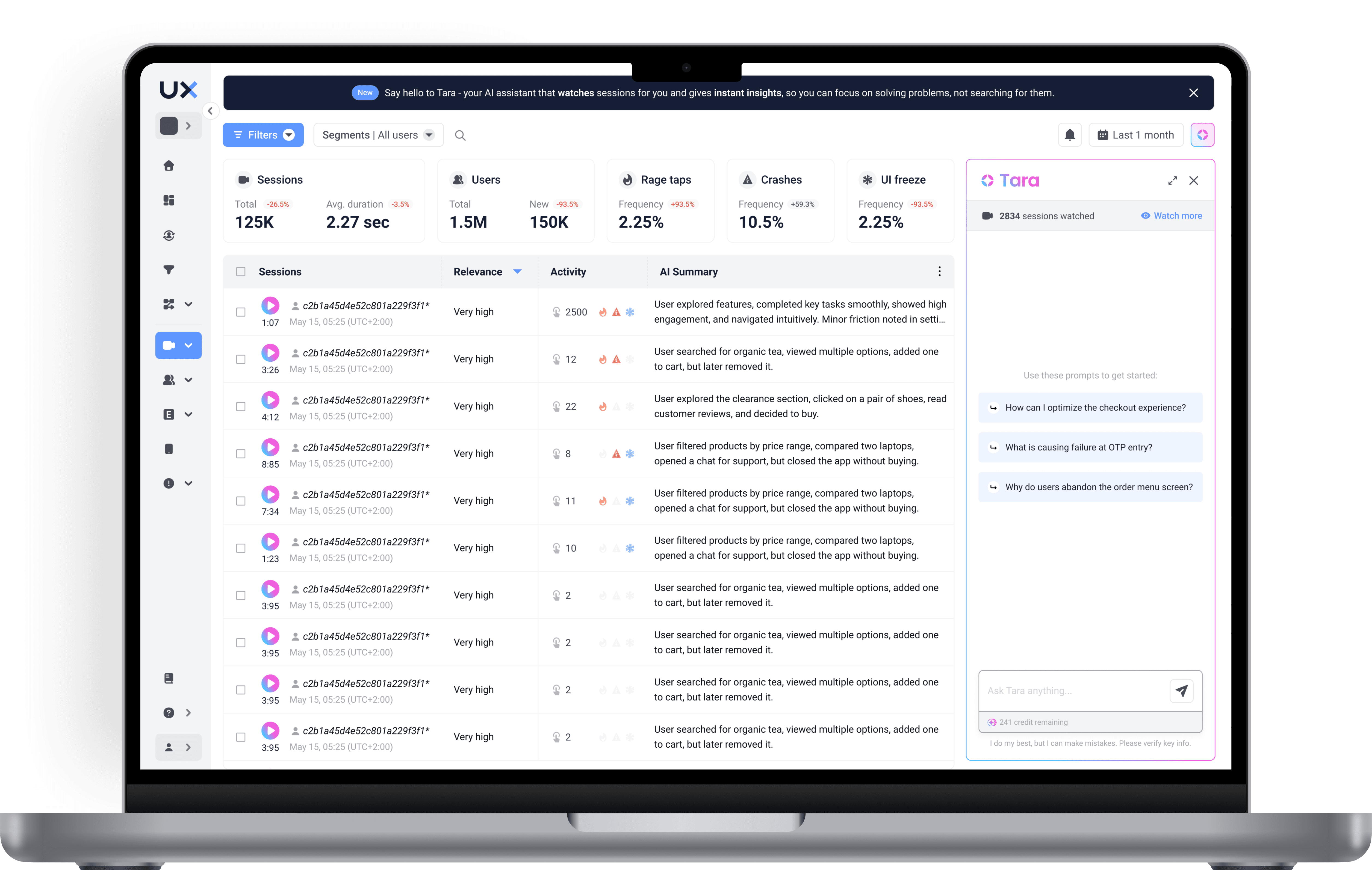
I led the design of an AI-powered session analysis feature for UXCam, a product analytics platform that helps teams understand user behavior through session recordings, heatmaps, and event analytics. The challenge was to give users meaningful control over the AI watched sessions while making a complex credit system feel transparent and fair. I explored multiple approaches with the team, validated designs with beta users, and delivered a solution.
Design Challenge
Design a system that lets users direct AI analysis for the sessions they care about. Users were asking the AI questions it couldn't answer because it hadn't watched the right sessions yet. As UXCam prepared to launch paid AI plans, I needed to design how users allocate and spend AI analysis time across their apps and teams, while also giving them control over which sessions get watched.
Context
UXCam records thousands of sessions daily for its customers. The company introduced an AI analyst that watches session recordings, identifies friction points, and answers natural-language questions like "Why are users dropping off during onboarding?" or "What's causing checkout errors?". AI could only watch a limited number of sessions each day (approximately 100, prioritizing recent sessions under 10 minutes to optimize processing time). But customers were recording far more sessions than that. This created a gap — the session a user wanted insights about might not have been watched yet.
The business opportunity:
Leadership decided it was time to monetize the AI capability by introducing paid analysis plans. This meant designing entirely new systems that didn't exist yet: a minute-based credit model, a way for users to direct their purchased analysis time toward specific sessions, and a multi-app allocation system — because each company typically tracked multiple apps within UXCam, and purchased minutes needed to be distributed across all of them.
How users encountered this gap:
Users approached AI from different entry points — through the session list, from a filtered view, from a funnel drop-off, or by asking a direct question. In each case, they expected the AI to have watched the sessions relevant to their query. When it hadn't, the experience broke down and the AI would not have data for reference.
Key Responsibilities:
Defined the problem space through stakeholder alignment and constraint mapping
Explored multiple design directions: single-session analysis, batch processing, and rule-based automation
Conducted user validation sessions with beta testers
Delivered validated designs to the engineering team
Problem
The existing AI chat was free and watched sessions randomly. Users had no control over which sessions the AI watched, no visibility into how their purchased analysis time was being consumed, and no way to prioritize sessions that mattered to their current investigation.
Why it mattered:
Users asking AI questions about specific user segments would get incomplete or irrelevant answers if those sessions hadn't been watched
Teams purchasing analysis minutes had no transparency into consumption AI daily watched sessions at random which meant the AI's insights might never cover the sessions most relevant to a team's current goals
Without user control, AI's value proposition — "ask anything about your users" — felt unreliable
Growing competition from tools like FullStory adding AI features created urgency to ship a differentiated solution
Goals
Give users meaningful control over session analysis without introducing bias into overall product insights
Make the minute-based credit system transparent and predictable for teams
Design a system that works for teams of 1 and teams of 10 sharing the same resource pool
Prioritizing the MVP solution over the most complete one due to rising AI competition
Research
Stakeholder alignment: Mapped constraints with product leadership, engineering, and data science to understand technical limitations (parallel processing speeds, session length impact on analysis time)
User entry point mapping: Documented the different paths users take to reach sessions (session list, filtered views, funnel analysis, direct AI questions) to understand where the "not watched" gap would surface
Competitive analysis: Reviewed how competing analytics platforms were approaching AI-assisted analysis and credit/usage models
Beta tester interviews: Conducted validation sessions with beta users to test different analysis selection approaches
Key Findings
Research and stakeholder discussions revealed five interconnected challenges that couldn't be solved in isolation:
The bias problem was real and non-negotiable. If users only watched sessions where they suspected issues (rage taps, drop-offs, errors), the AI's overall product insights would skew negative. When a user asked "What's my overall conversion rate?", the answer would be artificially low because only problem sessions were in the dataset. Leadership's solution — a 50/50 split between random and user-selected analysis — was the right constraint, but it created its own design challenges.
"Analysis minutes" was a concept users had no mental model for. We were introducing an entirely new resource type. Unlike storage or API calls, users had no intuitive sense of what an "analysis minute" meant — how long a AI takes to watch sessions, why some sessions cost more than others, or why half their purchased minutes would be consumed automatically. If the first experience of purchasing a plan felt like a black box, adoption would stall before it started.
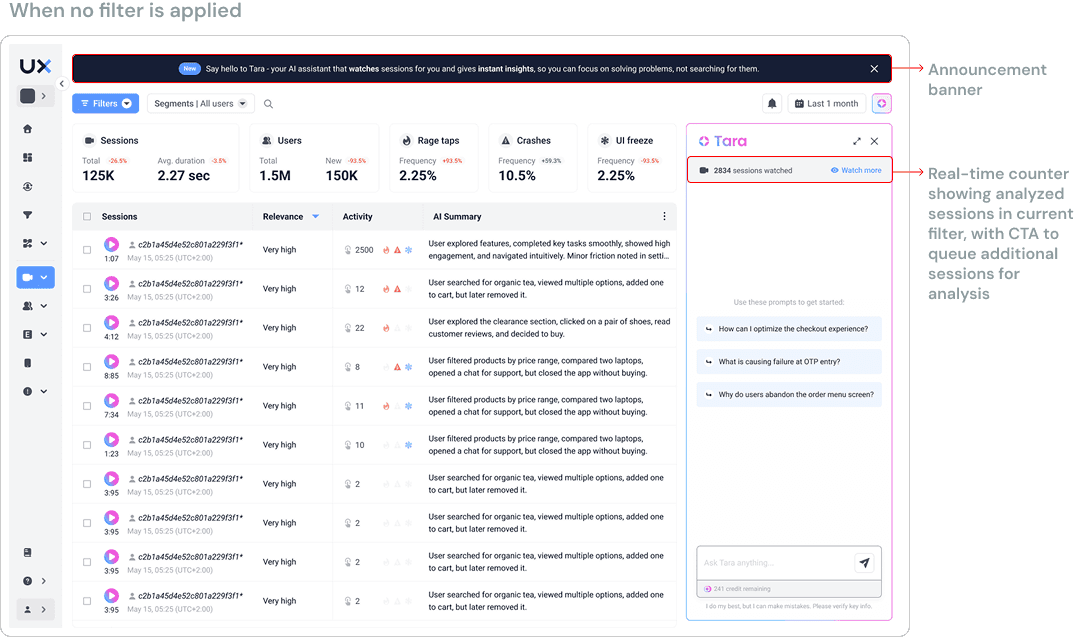
The context bar created a comprehension problem. The UI showed a count of watched sessions in context (e.g., "847). When users applied filters, if filtered sessions hadn't been watched, this number would change unexpectedly. Users couldn't distinguish between "sessions that match my filter" and "watched sessions that match my filter," leading to confusion about what the AI actually knew.
Users don't log in daily — they come with a purpose. Unlike a daily-use tool, users typically visited when they had a specific question or were investigating a specific issue. This meant the selection mechanism needed to support both on-demand analysis ("watch these sessions now") and an automation ("always watched sessions from this user segment").
Beta testers expressed a clear preference for rule-based analysis — the ability to say "always watch sessions from users in the onboarding flow" or "prioritize sessions with rage taps." However, this approach had significant technical complexity and would extend the timeline beyond.
Strategy
Based on findings, I worked within three strategic principles:
Transparency for trust
Rather than hiding the complexity of the 50/50 split and minute consumption, make it visible and understandable. Users who understand the system trust the system — even when it has limitations.Batch processing as the viable MVP; rules as the vision
Single-session analysis was too slow (edge case), rule-based automation was too complex. Batch processing hit the middle ground: users could select groups of sessions to watch, which aligned with how the parallel processing worked technically and how users actually investigated issues (rarely one session at a time).
Solution
Transparent Minute Allocation Dashboard
Designed a clear breakdown of how purchased analysis minutes are distributed and consumed.
A persistent indicator showing two distinct pools — "Automatic Analysis" and "Your Analysis" — each with its own progress bar. This immediately communicated three things: how much total time was purchased, how much was reserved for the system's unbiased analysis, and how much the user/team had available to direct.
Addressing the context bar confusion
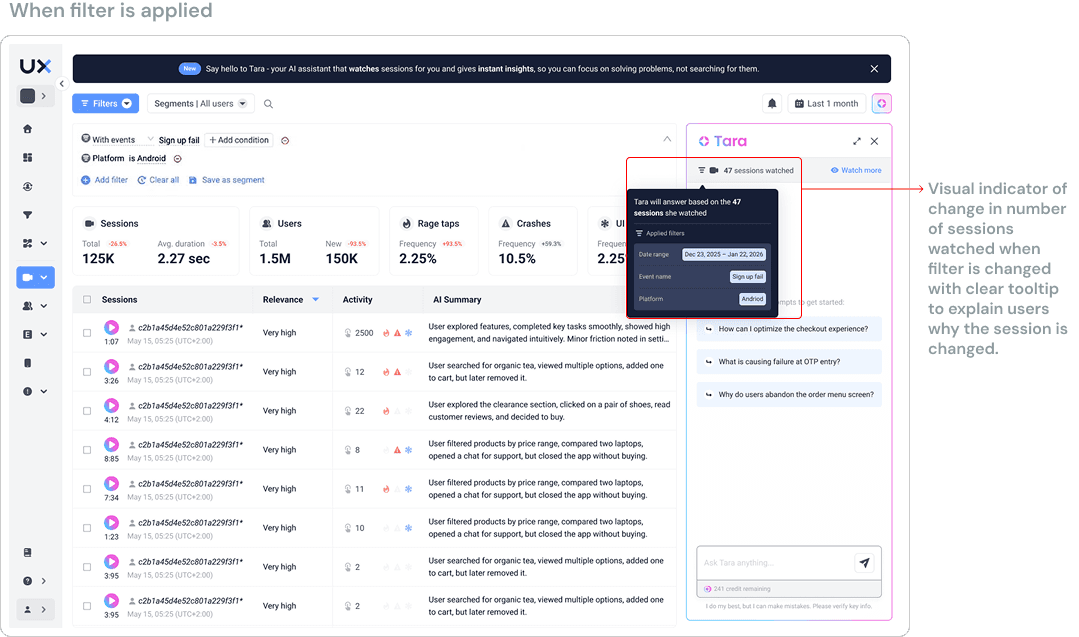
Beta users were confused when the session count changed after applying filters and more importantly what this number meant. I added a label showing "X sessions watched" and a rich tooltip that appeared on count changes, explaining "Showing analyzed sessions matching your current filters."
Batch Session Analysis Selection
Designed a batch selection flow that integrates with existing session filtering and lets users queue groups of sessions for analysis.
How it works:
Users apply their existing filters (by screen, event, user segment, date range, frustration signals) to narrow down sessions. From the filtered view, they can trigger AI to watch sessions. The system estimates minute consumption before confirming, so users always know the cost before committing.
Design decisions:
Integrated the "Watch" action into the existing session list toolbar rather than creating a separate analysis management page — this kept the feature within users' existing workflow
Added an "estimated minutes" preview that calculates based on average session lengths in the selected batch, giving users cost clarity before committing
Included an "status" indicator on individual sessions (watched / queued / not watched) so users could see at a glance which sessions AI already knew about
Designed a confirmation step that shows: number of sessions, estimated minutes, remaining balance after analysis
Addressing the context bar confusion:
When filters were applied, the analyzed session count now included a clear label distinguishing "X of Y filtered sessions analyzed by Tara." When the count changed due to filtering, a subtle tooltip explained: "This shows analyzed sessions matching your current filters." This resolved the comprehension gap identified in research.
Analysis Status Integration Across Entry Points
Designed consistent "status" indicators across all the places users encounter sessions — the session list, funnel views.
In the session list: Each session shows a small indicator — a checkmark for watched, a clock for queued, and no indicator for not watched. Users can filter by analysis status to quickly find gaps.
Constraints
The 50/50 split was non-negotiable, but created a perception problem. Users who purchased minutes expected full control. Having half consumed automatically felt like losing value.
Trade-off: I invested heavily in explaining the "why" (data integrity) through contextual education rather than trying to hide the constraint. The design made the automatic analysis feel like a feature ("we protect your data quality") rather than a tax.
Rule-based analysis was the validated preference, but couldn't ship within the time limit. Beta testers clearly preferred setting persistent rules ("always watch sessions from segment X").
Trade-off: Since users expressed a strong need for this feature, research validated its importance, and the team prioritized it as the next improvement for the MVP.
Limited validation window due to project transition. I validated designs with beta users and shared to engineering.
Trade-off: I documented detailed design specifications, edge cases, and the rationale behind each decision to ensure continuity.
Outcome
I delivered validated designs for the AI session analysis system. The designs covered the credit visibility system, batch analysis selection, analysis status indicators, and team resource transparency. The feature has since launched as part of UXCam's AI product.
Reflection
Constraints can be the most interesting design problem. The 50/50 split could have been a dealbreaker for user trust. Designing transparency around it — making the constraint feel like a feature rather than a limitation.
Ship the foundation, not the vision. Batch processing wasn't what users wanted most (they wanted rules). It validated the core interaction patterns, and created a natural evolution path.
